Tutorial
django-args builds on the foundational elements of python-args
and allows engineers to construct forms and views directly on top of
functions.
In contrast with Django forms, which provide several mechanisms to
clean fields and validate input, django-args promotes the philosophy
of keeping validation logic closer to the core code, which is
where python-args comes into play.
By decorating a function with python-args @arg.validators(...),
a Django form can be seamlessly adapted to a python-args function,
ensuring that you never repeat validation logic for a function and
form fields that collect function arguments.
We will first dive into how this works with the djarg.views.FormView
class and construct a view from a python-args function.
Creating a FormView
This example assumes the user has knowledge of python-args constructs.
If not, please read the
python-args docs first.
Adapting a python-args function to a form
We start by creating a function that will modify the is_staff
flag of a Django user in the database. The function takes the user
being modified, the person granting access (or revoking), and the value
of the is_staff flag.
We validate the arguments using @arg.validators():
import arg


def ensure_granter_is_staff(granter):
    if not granter.is_staff:
        raise ValueError('Granter must be staff to grant staff access.')


@arg.validators(ensure_granter_is_staff)
def grant_staff_access(user, granter, is_staff):
    user.is_staff = is_staff
    user.save()
This function has a single validator that ensures the granter has sufficient privileges to grant staff access.
When functions are decorated with @args.validators(), those validators
can be directly adapted to a Django form that collects the arguments.
For example, before we write the form view for this function, let’s write
the form:
from django import forms


class GrantStaffAccessForm(forms.Form):
    user = forms.ModelChoiceField(queryset=User.objects.all())
    granter = forms.ModelChoiceField(queryset=User.objects.all())
    is_staff = forms.BooleanField()
Although we would likely determine the user performing the request from
some other means, this form purely serves as an example. Given this form
that collects the input needed for our grant_staff_access function,
we can call djarg.forms.adapt to adapt the GrantStaffAccess
form to the grant_staff_access function:
import djarg.forms

form_instance = djarg.forms.adapt(GrantStaffAccess(), grant_staff_access)
Instead of having to specify validators for form fields or performing a custom
form clean() method, all of the validators on the function are automatically
used when relevant. For example, any validators that only take the form
field as an argument are used as validators on the individual field, while
validators that take multiple arguments are used in the form clean() method.
When building forms on top of complex functions with many layers of validation, this can not only help reduce the complexity of frontend code, but it also offers the ability to more easily test validation and keep the core validation code closer to the business logic.
Automatically adapting forms with djarg.views.FormView
Users will typically not be using djarg.forms.adapt directly like shown
and will instead be using djarg.views.FormView. For example:
import djarg.views


class GrantAccessView(djarg.views.FormView):
    form_class = GrantStaffAccessForm
    func = grant_staff_access
The djarg.views.FormView automatically adapts the form class to the
provided python-args function func. When forms are successfully
validated, func is called in the form view’s form_valid
method. And voila, you have a Django Form View directly built on top
of a function with much less boilerplate.
django-args tries to abide by the principle of keeping as much
validation logic as possible out of the view and form layer, a complexity
that can compound when working with sophisticated input and validation
scenarios.
So, what if we instead want to provide the currently authenticated user
as the granter argument to our grant_staff_access function? It
is far more common to use the currently-authenticated user as the person
performing actions in a view.
The djarg.views.FormView class does not require that all func
arguments come from the form. Others can also dynamically come from
the get_default_args() method. For example, assuming we are using
Django’s authentication middleware, we can update our form and view like so:
from django import forms

import djarg.views


class GrantStaffAccessForm(forms.Form):
    user = forms.ModelChoiceField(queryset=User.objects.all())
    is_staff = forms.BooleanField()


class GrantAccessView(djarg.views.FormView):
    form_class = GrantStaffAccessForm
    func = grant_staff_access

    def get_default_args(self):
        return {
            **super().get_default_args(),
            'granter': self.request.user
        }
In the above, the user and is_staff fields will be selected by
the user. The granter argument is provided from the get_default_args
method.
Note
The request variable is always included in the default args and
accessible to the wrapped function in the view. The example
from above could have also used
@arg.defaults(granter=arg.val('request').user)(grant_staff_access)
as the func attribute to accomplish the same thing.
The djarg.views.FormView is just like any other
django.views.generic.edit.FormView. You have access to the form
variable in the template. For example, we can render our form with
the following template:
<form action=".?{{ request.GET.urlencode }}" method="post" enctype="multipart/form-data">
  {% csrf_token %}

  {{ form.as_p }}

  <button type="submit">
    Submit
  </button>
</form>
Assuming that we’ve linked a URL to our view, the form view behaves like so:
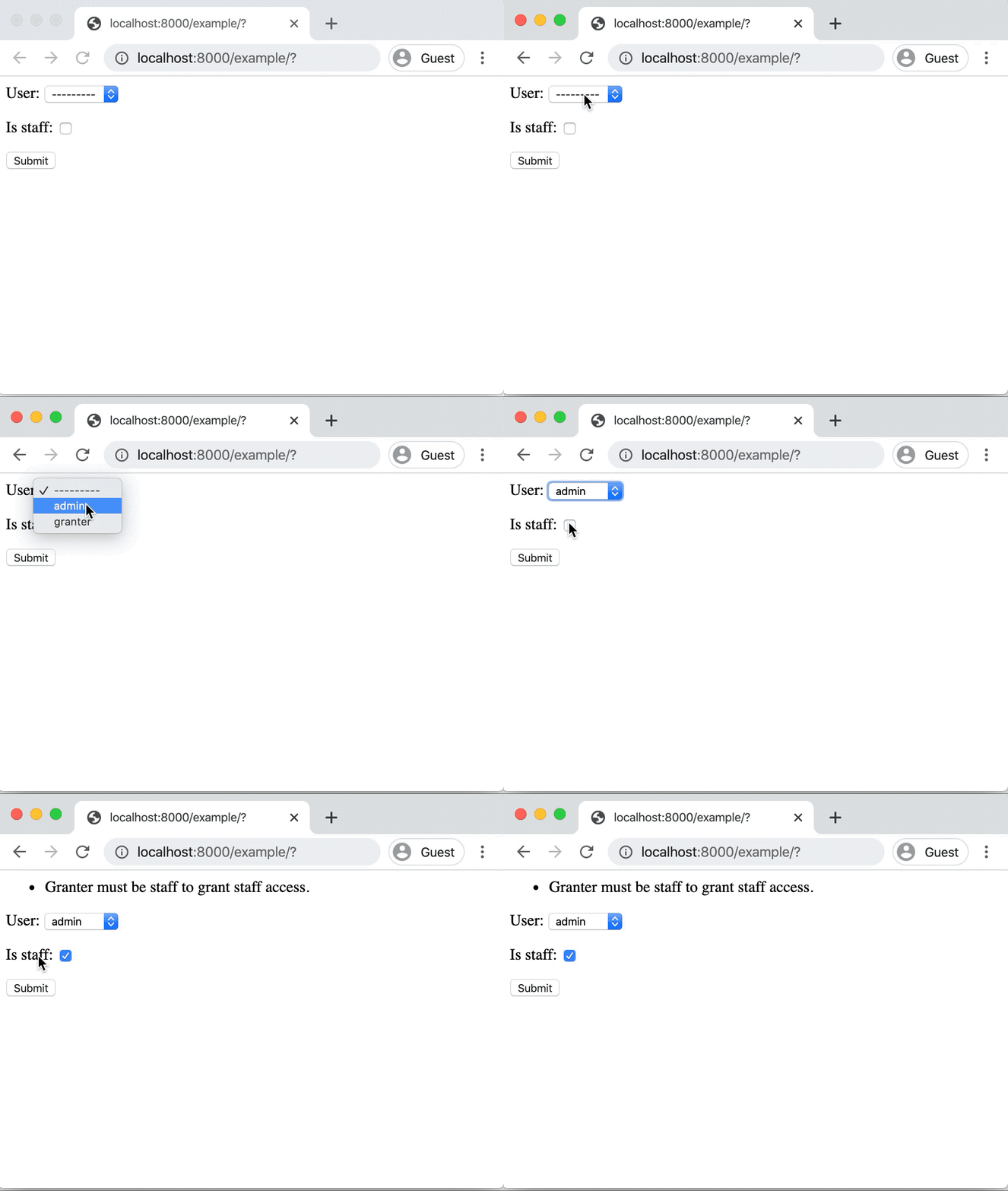
In the above, the ensure_granter_is_staff validator is failing
because the authenticated user is not a staff member. When this validator
fails, it appears as a failure of the form’s clean() method and rendered
by Django.
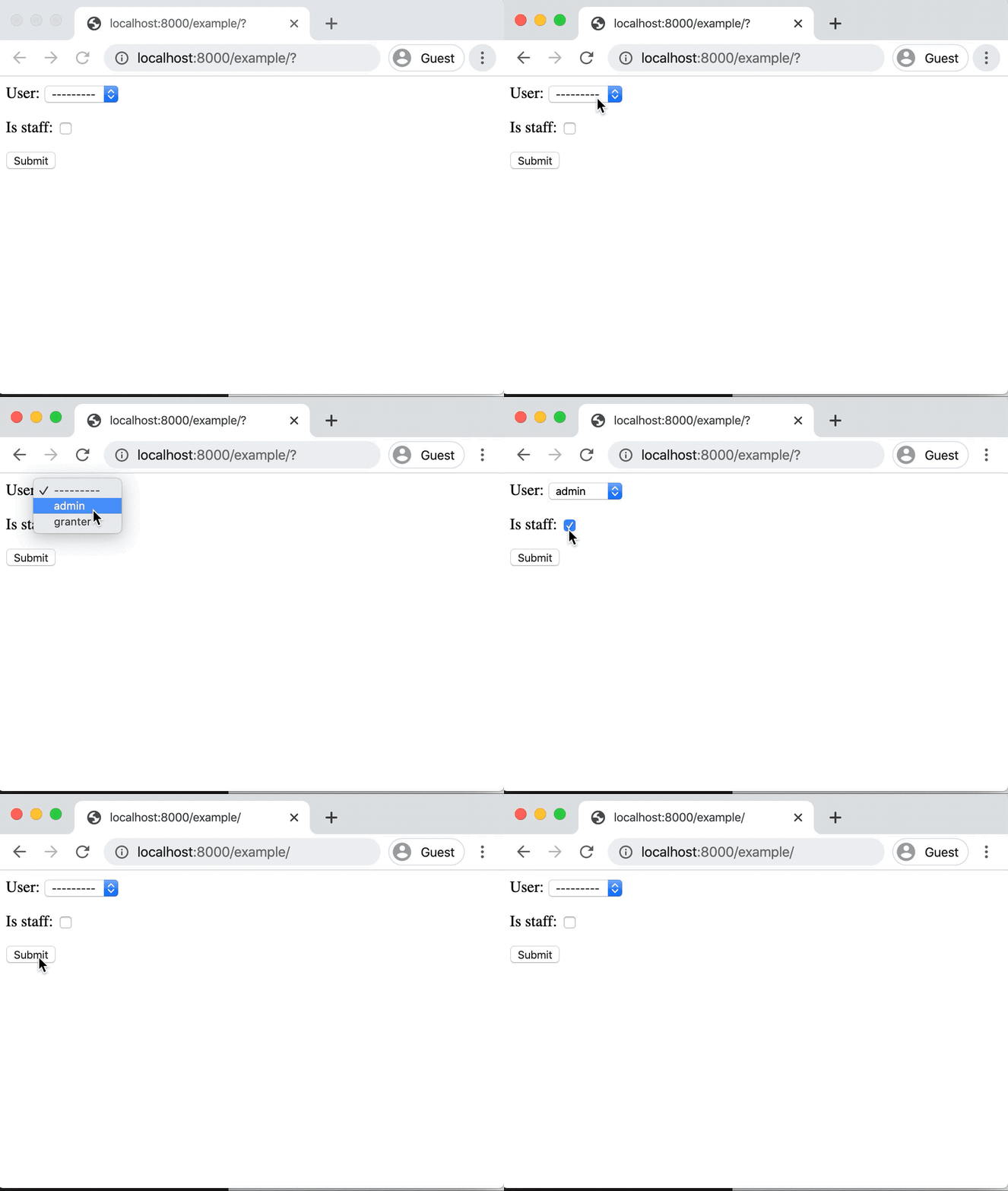
When all validation passes, the view runs func. In
this example, the form redirects back to an empty slate on success:
Lazy form fields using python-args utilities
When djarg.views.FormView adapts the form, it also ensures that
the form is compatible with various lazy execution utilities in python-args.
A common pattern in Django forms is to dynamically modify field attributes based on data passed from the view. For example, let’s continue our example of granting staff access and dynamically render choices based on the permission level of the granter.
class GrantStaffForm(forms.Form):
    reason = forms.ChoiceField(choices=[('', '---')])
    user = forms.ModelChoiceField(queryset=User.objects.all())
    is_staff = forms.BooleanField()

    def __init__(self, **kwargs):
        # Assume the user has overridden the view's ``get_form_kwargs``
        # method and passed in the user
        granter = kwargs.pop('granter')

        super().__init__(**kwargs)

        if granter.is_staff:
            self.fields['reason'].choices = [
                ('reason_type1', 'Reason type 1'),
                ('reason_type2', 'Reason type 2')
            ]
        elif granter.is_superuser:
            self.fields['reason'].choices = [
                ('reason_type1', 'Reason type 1'),
                ('reason_type2', 'Reason type 2')
            ]
Basic user experience tweaks like these can make dynamic form processing
code more difficult to follow and unwind. Not to mention the additional
boilerplate needed in order to pass the granter as a keyword argument
to the instantiation of the form.
django-args integrates with python-args arg.init utility
that allows lazily loading a class. Use djarg.forms.Field to wrap
a field so that field properties can be lazily evaluated.
In this example, we are still using our earlier GrantStaffView
example. When get_default_args is implemented, all of these arguments
are available to use when using djarg.forms.Field and associated
python-args utilities. For example, here’s our updated form:
def get_grant_reasons(granter):
    if granter.is_staff:
        return [
            ('staff_reason_1', 'Staff Reason 1'),
            ('staff_reason_2', 'Staff Reason 2')
        ]
    elif granter.is_superuser:
        return [
            ('superuser_reason_1', 'Superuser Reason 1'),
            ('superuser_reason_2', 'Superuser Reason 2')
        ]
    else:
        return [('', '---')]


class GrantStaffForm(forms.Form):
    reason = djarg.forms.Field(
        forms.ChoiceField,
        choices=arg.func(get_grant_reasons)
    )
    user = forms.ModelChoiceField(queryset=User.objects.all())
    is_staff = forms.BooleanField()
In the above, we have used djarg.forms.Field to lazily instantiate
a Django form field of class forms.ChoiceField. When instantiating
the field, we lazily execute the get_grant_reasons function to
fill in choices. Since the granter argument is available to our
form as a default argument, it can be used in python-args lazy
utilities (for a refresher on these, check out the
python-args docs).
With this slight change, we have less boilerplate in our forms. We can extend this concept to dynamically creating querysets for model choice fields, dynamic initial values, dynamic widgets, and any other attributes required by Django form fields.
In this example, any form field has access to the default arguments
provided by the view. In the next section of this tutorial, we expand on
these concepts with the introduction of djarg.views.WizardView, which
along with default arguments, allows form steps and conditions to
be dynamically determined from previously entered steps.
Creating a WizardView
django-args comes with an integration with
django-formtools.
django-formtools has several wizard objects. django-args
provides the base djarg.views.WizardView object and the
djarg.views.SessionWizardView that uses a session storage backend to
track steps.
For those unfamiliar with django-formtools, the wizard object
allows a user to provide a series of forms that are collected over
subsequent steps. Users can also define conditions so that steps
can be conditionally included or ignored. Consult the
django-formtools docs
for more information.
Similar to how dynamic form field instantiation can lead to a lot of boilerplate,
dynamically instantiating form fields and conditionally showing steps
in form wizards can also incur a significant amount of boilerplate.
django-args aims to not only allow form wizards to be seamlessly
built on top of python-args functions, but to also minimize the associated
boilerplate for various user experience patterns.
Collecting input over multiple steps
For example, let’s use our grant staff function and collect information over multiple steps. We are going to make a modification to our function and also take in the reason and an explanation:
def ensure_granter_is_staff(granter):
    if not granter.is_staff:
        raise ValueError('Granter must be staff to grant staff access.')


# Make sure we have clean text input that is stripped
@arg.defaults(
    reason=arg.val('reason').strip(),
    explanation=arg.val('explanation').strip()
)
# Make sure the granter is the right tier
@arg.validators(ensure_granter_is_staff)
def grant_staff_access(user, granter, is_staff, reason, explanation):
    user.is_staff = is_staff
    user.save()

    # Log the reason and explanation associated with the change
    GrantRecord.objects.create(
        granter=granter,
        user=user,
        is_staff=is_staff,
        reason=reason,
        explanation=explanation
    )
In this example, we extend our function to log a record of grants
with reasons and explanations. We also use @arg.defaults to clean
our input. Although the form will clean up some of the input for us,
this extra layer of protection ensures other functions calling ours
will have clean input.
Now let’s make a form wizard that leads people through collecting information step-by-step. We do this by splitting our input into separate forms:
class GrantStaffReasonForm(forms.Form):
    reason = djarg.forms.Field(
        forms.ChoiceField,
        choices=arg.func(get_grant_reasons)
    )


class GrantStaffExplanationForm(forms.Form):
    explanation = forms.CharField()


class GrantStaffUserForm(forms.Form):
    user = forms.ModelChoiceField(queryset=User.objects.all())
    is_staff = forms.BooleanField()
In the above, we collect the information needed for our wizard over three steps. The form wizard object looks like the following:
from django import shortcuts

import djarg.views


class GrantStaffWizard(djarg.views.SessionWizardView):
    func = grant_staff_access
    form_list = [
        GrantStaffReasonForm,
        GrantStaffExplanationForm,
        GrantStaffUserForm,
    ]

    def get_default_args(self):
        return {'granter': self.request.user}

    def done(self, *args, **kwargs):
        self.run_func()
        return shortcuts.redirect('.')
Similar to our djarg.views.FormView example, we use the authenticated
user as the default argument for granter. Since django-formtools
requires us to implement a done() method, we call run_func()
to run the function with the cleaned form wizard data and redirect back
to the starting of the wizard.
djarg.views.SessionWizardView extends the session wizard from
django-formtools, so we can create a wizard template that behaves
similarly:
{{ form.media }}

<form action=".?{{ request.GET.urlencode }}" method="post" enctype="multipart/form-data">
  {% csrf_token %}
  {{ wizard.management_form }}
  {{ form.as_p }}

  {% if wizard and wizard.steps.current != wizard.steps.last %}
      <button type="submit">Next</button>
  {% else %}
    <button type="submit">
      Submit
    </button>
  {% endif %}
</form>
When saving this template and updating the template_name attribute on
our wizard view, we can then go through the view after linking it in our
urls file. It looks like the following:
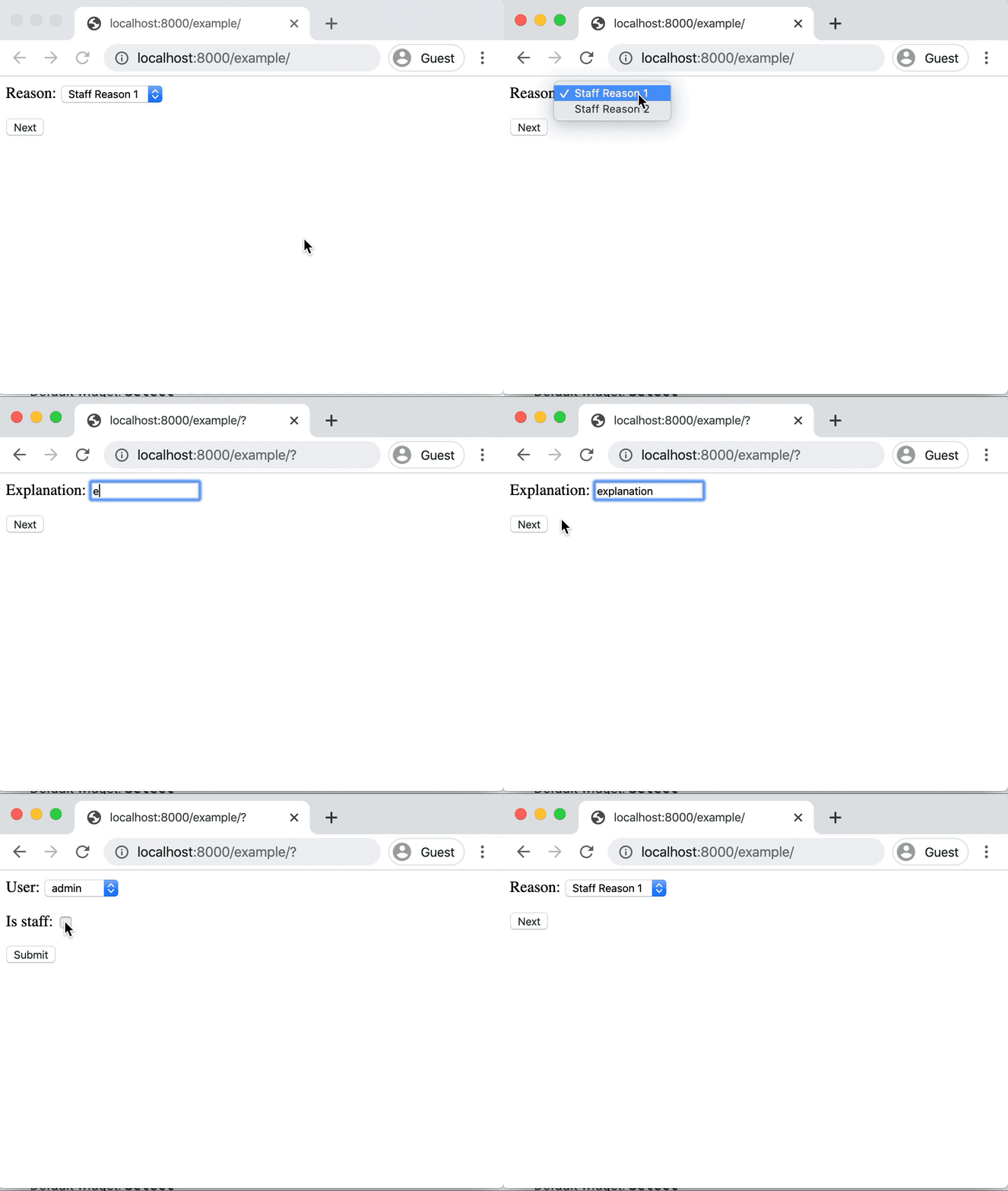
As shown above, our first step dynamically determines the reasons. Since the user in this example is not a superuser, the staff reasons are shown. Once the user has performed the flow, the function runs and they are redirected back to the beginning.
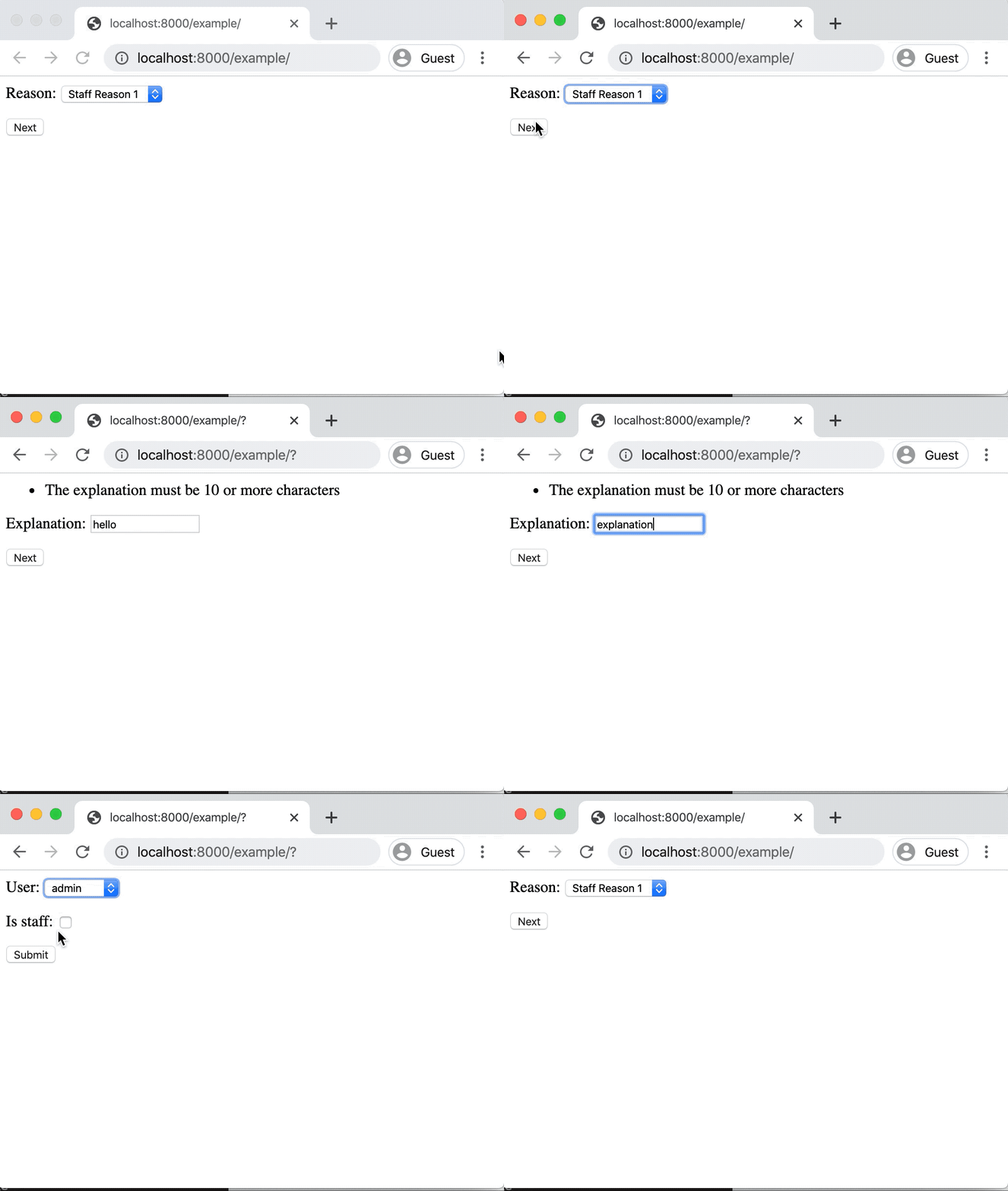
Form wizards are not all that different in how they perform validation in comparison to the standard form view. For example, if we attach a validator to the explanation to ensure that it’s a minimum length, this validator will only execute on the second step. For example:
def explanation_must_be_long(explanation):
    if len(explanation) < 10:
        raise ValueError('The explanation must be 10 or more characters')


@arg.defaults(...)
@arg.validators(ensure_granter_is_staff, explanation_must_be_long)
def grant_staff_access(user, granter, is_staff, reason, explanation):
    ...
Adding this validator produces a flow like the following:
Conditional step collection
django-args integrates seamlessly with conditional step execution
in django-formtools. Similar to how djarg.forms.Field allows
for lazy loading of form fields based on default arguments and previous
steps, conditions can also utilize default arguments and any previous
steps that were successfully submitted.
For example, let’s update our grant_staff_access to optionally
allow an explanation and remove minimum length requirements.
Let’s also update our form wizard to only show the explanation step
if the first reason is chosen:
def should_show_explanation_step(reason):
    """Only collect an explanation when the reason is the first reason"""
    return reason in ('staff_reason_1', 'superuser_reason_1')


@arg.defaults(...)
@arg.validators(ensure_granter_is_staff)
def grant_staff_access(user, granter, is_staff, reason, explanation=''):
    ...


class GrantStaffWizard(djarg.views.SessionWizardView):
    func = grant_staff_access
    form_list = [
        GrantStaffReasonForm,
        GrantStaffExplanationForm,
        GrantStaffUserForm,
    ]
    condition_dict = {
       '1': arg.func(should_show_explanation_step)
    }

    ...
In the above, we utilize django-formtools condition_dict
attribute, which allows us to specify functions that determine if steps
should be shown. Although django-formtools allows you to label your steps,
not labeling them results in the first step being labeled "0", the
second step "1" and so on. In our case, we have instructed that the second
step only be shown if we pick the first reason.
Since djarg.views.SessionWizardView makes all of the submitted arguments
available to python-args functions, we can create conditions that will
use previously-submitted steps. In our case, that step is the reason
field that was collected.
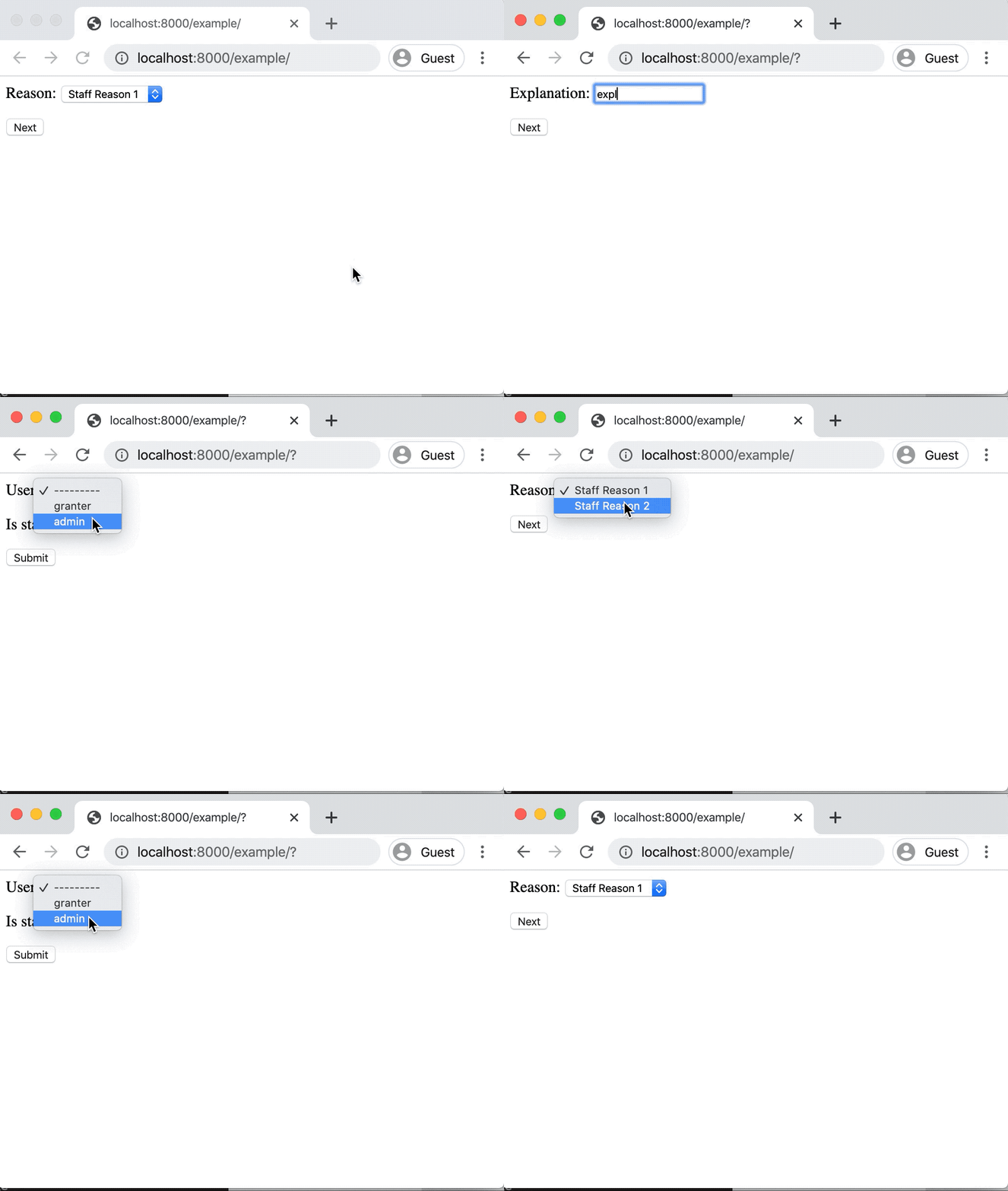
Here’s what it looks like if we choose the first reason in the first step and the second reason in the first step. The former prompts the user for an explanation while the latter does not:
Using single and multiple object views
The base form and wizard views from django-args have child subclasses
that make it easier for updating individual and multiple objects.
This follows from a similar philosophy of Django’s generic update
views (UpdateView, CreateView, etc).
Each main view has an associated Object view for editing a single object
and Objects view for editing multiple objects.
Using ObjectFormView and ObjectWizardView
The djarg.views.ObjectFormView is functionally the same as
djarg.views.FormView, and this is also true for djarg.views.ObjectsWizardView.
Similar to
Django’s Generic Editing Views,
any URL constructed from a single object view has an associated primary key
field in the URL (i.e. /url-path/<int:pk>/). Along with that, views
must provide a model or queryset attribute so that Django knows how to
fetch the object.
When views are constructed, the object variable is a default argument
for func and is available in the view like other Django edit views.
It is up to the user constructing the python-args func attribute
to map the object argument to the associated object of their function.
All of these properties apply to both djarg.views.ObjectFormView
and djarg.views.ObjectWizardView classes.
Using the ObjectsFormView and ObjectsWizardView
The djarg.views.ObjectsFormView and djarg.views.ObjectsWizardView
are identical to their individual object counterparts with the following
differences:
Instead of an
objectdefault argument, there is anobjectsdefault argument and view variable with all of the objects.Instead of taking a primary key argument from the URL, the primary keys of all objects are determined from the URL query string. For example,
/url-path/?pk=1&pk=2will operate over two objects. If PKs aren’t provided or if any PKs don’t exist, a 404 is raised.
Similar to the single object views, the func attribute must map the
objects variable to the proper argument in the function. One can
also use arg.parametrize to parametrize a list of objects to
single-object functions.
Other django-args view settings
By default, django FormView and form-tools WizardView classes
do not display form errors when errors happen after form or
wizard validation. django-args defaults to rendering these errors
as normal form errors. In the case of wizards, runtime errors are
rendered on the last step.
This behavior can be suppressed by setting the raise_run_errors attribute
to True in the view or wizard definition.
Other django-args utilities
Using djarg.qset
python-args comes with several utilities for lazily-evaluating call
arguments. django-args also comes with a djarg.qset utility for
coercing argument defaults into querysets.
For example, say that you want to ensure your function is always called with a queryset that has properly cached all necessary relations:
@arg.defaults(
  users=djarg.qset('users', model=User).prefetch_related('groups')
)
def get_user_groups(users):
    """Return all of the groups of the users"""
    return {
        group
        for user in users
        for group in user.groups.all()
    }
When using djarg.qset, the argument (in this case users) will be
coerced into a queryset. Similar to other python-arg lazy utilities,
the queryset value can be lazily chained to be evaluated.
Since our function always prefetches groups, one does not have to worry about the caller prefetching the proper relations for the function.
The djarg.qset utility automatically coerces the other values:
None, which will return an empty queryset.A single model.
A list of models.
A single PK or list of PKs.
For example, one can also do get_user_groups([user_id1, user_id2]) with
the djarg.qset utility.
Note
In addition to providing a model as the argument to djarg.qset, one
can also provide a qset keyword argument as a queryset to use
when constructing the final queryset.
Locking objects with djarg.qset
The djarg.qset also comes with a select_for_update parameter to
dynamically perform locking with select_for_update if we aren’t
running in a partial python-args context (i.e. only running validators).
The select_for_update argument can be supplied in three ways:
djarg.qset(select_for_update=True): Useselect_for_updatewith the default parameters.djarg.qset(select_for_update=['relations']]): Useselect_for_updatewith theofargument set to the list of relations.djarg.qset(select_for_update={'skip_locked': True}): Pass in keyword arguments directly toselect_for_update.
Again, the key advantage of using the select_for_update argument in
djarg.qset is that it will only apply the select_for_update when
not running in partial python-args mode. This ensures objects won’t be
locked when only running validators, for example.
Using djarg.views.SuccessMessageMixin
Similar to
Django’s SuccessMessageMixin,
the djarg.views.SuccessMessageMixin allows users to define a
success_message attribute that is rendered on successful completion of any
django-args views. The success message is automatically formatted with
the arguments passed into the func of the view. One can also override
get_success_message to dynamically construct success messages based on
the arguments and results of the func. For example:
class GrantStaffWizard(djarg.views.SuccessMessageMixin, djarg.views.SessionWizardView):
    func = grant_staff_access
    success_message = 'Successfully granted staff access from {user}.'
Or:
class GrantStaffWizard(djarg.views.SuccessMessageMixin, djarg.views.SessionWizardView):
    func = grant_staff_access

    def get_success_message(self, args, results):
      return f'Successfully granted staff access from {args["user"]}.'